Perfect Seed Starter Labels

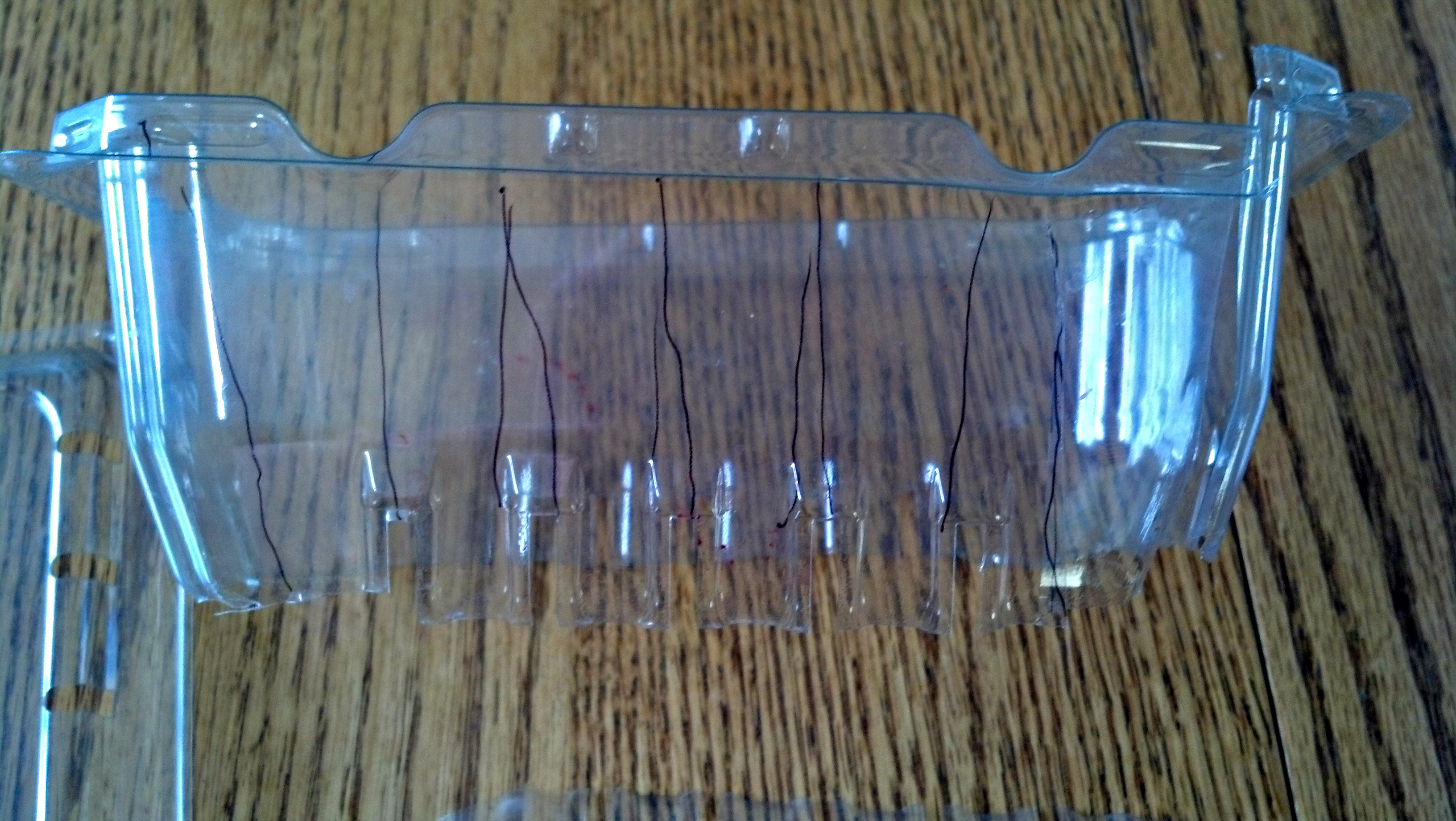
I’ve been trying to find perfect labels/tags for starting seeds. I’ve seen plant tags made from old yogurt containers, which work well for once the plants are in the garden. That was my plan until I found this strawberry box in my recycle bin.

If you use a 1/4″ tape label maker or you write small, cutting up a strawberry box makes great tags for labeling the tiny compartments of a seed starting tray. First, they are clear instead of opaque which means the light will not get is blocked by the tags. Second, each tag has a little lip on which to place the variety of seed being planted. When the tag is slid into the top of a seed envelope, the lip stops it from falling all the way in.

To make the tags, first cut out the bottom of the strawberry box. Next,  cut wedges from the rest of the box. I’ve drawn lines on this box so you can see, but it’s easier to just wing it. Some of your tags won’t be perfect (you can choose whether to use them at the end when you’ve used the nicer ones, depending on how many you need). Lastly, trim the tags so they taper to a near-point for easier insertion.  Write or stick on labels. Voila!

Here they are in my envelopes, and in my seed binder, which is filled with sleeves designed for old-style floppy disks.

Leftover Turkey Pot Pie

I combined recipes to come up with this for dinner last night. My teen son said it was really, really good and why didn’t I make it more often? He even had it for breakfast. So I thought I would share.

You could just as easily use Bisquick or other baking mix for the topping. Just mix according to the package directions, but put enough liquid to be able to “glop” the topping onto the pie.(By the way, I use the same topping with a bit more sugar for fruit cobbler; it’s just an all-purpose drop biscuit ratio).

Leftover Turkey Pot Pie

2 cups frozen peas and carrots
1/3 cup butter
1/3 cup onion, chopped
1/3 cup flour
1/2 teaspoon salt
1/2 teaspoon ground pepper
1/4 teaspoon onion powder
1/2 teaspoon italian seasoning
3/4 cup chicken broth, or 1 cup
3/4 cup milk, or increase chicken broth and use cream
2 cups turkey meat, chopped
1 1/2 cups flour
1 1/2 teaspoons baking powder
1/2 teaspoon salt
1 tablespoon sugar
2 tablespoons light olive oil
1 cup milk, as needed

Preheat an oven to 375 degrees F (220 degrees C) or 350 convection.

Cook the peas and carrots. Drain the vegetables and set aside.

Melt the butter in a saucepan over medium heat, and cook the onion until translucent, about 5 minutes.

Stir in 1/3 cup of flour, salt, black pepper, onion powder, and Italian seasoning; slowly whisk in the chicken broth and milk/cream until the mixture comes to a simmer and thickens. Remove from heat; stir the cooked vegetables and turkey meat into the filling. Pour into a greased baking pan. (I used a square, but you could double the recipe and it should still fit in a 9×13).

Whisk together remaining flour, baking powder, salt, and sugar. Form a well and add oil. Add milk in increments, using what is needed to make a gloppy mess.  Drop “crust” onto filling, spreading  out if you can.  It won’t be smooth.

Bake in the preheated oven until the crust is golden brown, cooked all the way through (just take a fork and test the middle to make sure it’s not doughy)  and the filling is bubbly, 30 to 35 minutes. If the crust is browning too quickly, cover. Cool for 10 minutes before serving.

(credit for original recipe goes to http://allrecipes.com/recipe/dads-leftover-turkey-pot-pie)

Cooking day!

Earlier this week I realized that if I wanted to get a freezer cooking day in before the end of the year, with the Hobbit coming up and then the holidays, :) , I should do it this week.

My friend and I made six dishes today, with three more prepped and ready to put together tomorrow. We made a huge batch of granola, applesauce-kefir pancakes, ginger-apple oatmeal, frozen burritos, pineapple-ginger fried rice, and lower-oxalate pumpkin black-eyed pea chili. I thought I’d share a few of the recipes I chose here.

The granola was pretty simple, so I suggest you start with online recipes and customize. I used coconut sugar and maple syrup, coconut oil, and of course oats, fruits, and spice. For the pancakes I took an applesauce pancake recipe and put kefir and soured cream that was sitting in the back of my fridge, instead of the milk. (Note: I should have added a 1/2 teaspoon baking soda to counter the acid, but I forgot and they seem fine). The oatmeal was regular oats made with  a mix of water and milk (1:1:1 ratio) with whatever fruits etc I had on hand; in this case I put in shredded coconut, raisins, minced candied ginger, and almost as much chopped fresh apple as I put in oats. It came out wonderfully. The burritos also were pretty basic: ground beef with spices, rice, black olives, and shredded cheese. You can add salsa but it makes them a bit moist, so I suggest cooking it into the beef and draining well if you do.

The following two recipes, based loosely on ones I found around the ‘net, were fantastic enough to share in their entirety. The chili especially is a great new addition to my repertoire, as it’s subtly different than other chilis; sweet and a bit smokey.  For the pineapple rice, you might add ham, chicken, or shrimp. I didn’t, because a couple of weeks ago I bought a huge ham and divided it into steaks, so I’ll serve it with that.

(sorry about the formatting, I don’t have time to make it work right now).

Pineapple Fried Rice

Servings: 12
4 medium eggs, whisked
1/2 teaspoon salt
2 teaspoons olive oil
4 tablespoons coconut oil
4 tablespoons minced peeled fresh ginger
4 garlic cloves, minced
6 cups cabbage, finely chopped
6 cups cooked short-grain rice, must be cold
1/2 cup soy sauce
2 teaspoons toasted sesame oil
2 cups coarsely chopped pineapple
2 tablespoons fresh lemon juice
1 tablespoon minced fresh cilantro
4 cups peas and carrots, frozen
Optional: add 1-2 cups tofu, chicken, or shrimp
Heat olive oil in a large nonstick skillet or stir-fry pan over medium-high heat. Add eggs, and cook 8 lightly. Sprinkle
with salt. Remove from pan.
2. Heat coconut oil in pan over medium-high heat. Add ginger and garlic; stir-fry 2 minutes or until lightly browned.
Add cabbage, cook until slightly transparent. Add rice, and cook several minutes before adding remaining ingredients
except frozen vegies (if re-freezing).
3. To freeze, cool before adding frozen vegies.
.
.
Low Oxalate Pumpkin Chili
2 pounds ground beef
2 pounds ground turkey
1 pound bacon, cooked and drained
4 cups chicken broth
2 cups onion, roughly chopped
2 cups red bell pepper, roughly chopped
12 cloves garlic (6-8)
2 cups tomato juice
1 cup tomato sauce
3 cups cooked black-eyed peas
3 cups sweet corn
2 cans pumpkin
2-3 tablespoons chili powder
1/2 teaspoon cayenne pepper
2-3 teaspoons cumin
2 teaspoons fennel seed
2 teaspoons coriander
salt to taste
Brown the beef and turkey in a dutch oven or stew pot over medium heat. Pour off the grease (optional) and return to the stove [I used a crockpot]. Meanwhile, put the broth, onion, red pepper and garlic in a small saucepan and bring to a boil. Boil until the peppers and onions are soft. If desired, use a soup wand (stick blender) to puree the vegetables or put them into a blender or food processor and blend until  well pureed. Add the pureed vegetables and tomato juice/sauce to the beef and simmer for about 45 minutes to an hour. Add the beans and corn and spices (no need to drain the beans and corn unless you want to) and continue to simmer until the flavors have melded and the chili has cooked down to your desired thickness (drain the corn before adding for a thicker chili). Serve with chopped cilantro, shredded cheese or a dollop of yogurt if desired.

Managing my life with MyLifeOrganized

I’m a huge fan of a software product called MyLifeOrganized (mylifeorganized.net).  MLO is an advanced task and workflow manager that supports various methodologies (GTD, Pomodoro, etc). It is fairly easy to use the basics, but has many advanced options for setting up your system.  If you haven’t heard of it, you probably should skip the rest of this post, and instead consider installing the trial version.  Play around with it a bit, then come back here and this will make more sense.

I use MLO both on Windows (Windows Vista in my case; it also works using Wine on Linux, but I’ve never tried that), and on Android (other mobile platforms are supported but I have no familiarity with them). I’ll use the term “Desktop” to mean the full product on Windows, and “Android” to mean the MLO Android app, which does not have all of the features of the Desktop version.

I get a lot of questions about how I set up my MLO system. I’m happy to share, but with a few caveats:

(1) I’m currently an at-home, homeschooling mom with health issues and managing health issues for my family as well. My task system is designed to be very interrupt driven and flexible. I worked as a software engineer for HP for 10 years. I only *thought* my job was interrupt driven then.

(2) I don’t use a particular methodology. I gravitate toward GTD (Getting Things Done by David Allen), but never have taken the time to make it work for me. I find it tricky enough to actually have the brainpower to look at my task list. My “Start Weekly Review” task is about three years old. I’ve done informal reviews, but never enough to follow the process I tried to set up for myself, long ago when I read the book.  I’ve played around with layering Pomodoro technique onto my system and that was pretty effective when I was organized enough to use it.

(3) I change my system regularly. Part of this is to make it more efficient, but honestly another part is just to keep it interesting and “new,” — shiny. So my system when you read this may be much different than when I wrote it.

(4) I have not solved the perpetual “there are too many tasks in my system and I’ll never be able to do them all” problem.  My system seems to evolve to pushing more and tasks below the current priority line. The answer to the universe is 42. Other than that, I’ve got nothin’.

My Life Organized 5-Minute Primer

MLO allows you to structure your tasks differently than how you view them (slice/dice depending on what you want to see).  The tree structure, sometimes called the Outline, is static (stays the same unless you change it). Imagine this as similar to where your files are stored on your file system — the tasks “live” in the outline.

Each task has many properties that can be set or are calculated based on other properties. (E.g., “Active” is a property that depends on start date, whether it has children, and a number of other criteria that determine that this task is something you could work on right now). Views are basically saved searches for combinations of properties, and they update when a task’s properties change. An example of a view might be, “All active tasks marked as a Goal, grouped into Week/Month/Year Goals, and sorted by due date.”  Views are just searches and formatting of the data for display — they don’t change where the task “lives” relative to it’s parent tasks.

The Android app has a fixed set of views that are only partially customizable. The Desktop allows elaborate custom views to be created. For example, you could create a view that says, “Show me all of the active tasks which are due in the next week, except those that I’ve marked with a context (e.g., tag) of “@Home”.

I’m not going to explain all of my terms here in any detail, but you can look them up in the help or the user’s guide (http://mylifeorganized.net/support/index.htm, click on user’s guide for pdf).

Setup

Ok, that all said, here’s my current system.

My philosophy is to organize my outline tree based on where my brain feels tasks should live, similarly to how I organize my files or my kitchen (complete with a Junk Drawer, called Life Maintenance).  In general, my tree is organized by areas of focus (Life Maintenance, Home, Family, Work, Health…)

More specifically, my tree (outline) structure is flat at the top with the following folders:

  • <Inbox> – currently this has Goal=Week set, to force these tasks to show up in my daily lists (more on that later). Since Goal is inherited, as soon as I move new tasks to their proper homes, they will no longer be Week goals unless I manually set it.
  • 0 – My Routines & GTD – this is where I keep all of my daily/weekly/etc routines, so they don’t clutter other areas. One area of note, I have a subfolder called “Reuse” that contains common tasks, such as “return library books”. I just uncomplete and edit the existing task with a new due date instead of creating a new task. I put () in the title of each of these to indicate it’s recurring/reuse, to remind me not to delete it.
  • 1 – Life Maintenance – stuff that is not directly related to any of the other categories.
  • 2 through 9 Major life areas (3-Health, 4-Self, Community, Family, etc) numbered for quick access on the Desktop by typing that number
  • Templates–task trees that I want to use again. MLO has a setting called “Hide-in-todo” which “grays out” a branch and makes those tasks inactive.  They are visible in the outline structure, but not part of my working task lists. Because the Templates folder is marked with the “Hide-in-todo” setting, these don’t show up on any todo views, but if I duplicate a branch and move the duplicate to a new parent, it does show up in my todo views.

I use David Allen’s Getting Things Done concept of Someday/Maybe lists to keep my tasks manageable. For tasks that I don’t want to see in my task list but want to capture, I have a “Someday/Maybe” subfolder (branch) under each Life Area that has “Hide-in-todo” set on it. For me those are different than the tasks I actively intend to get to. I like to keep these in their general area, so that I can review them all at once, and move them in and out of the hidden branch depending on whether I want them active or not.

That’s pretty much it for my current tree structure. I’ve played around with marking tasks as Projects but haven’t found any use that I can maintain easily enough to make them worthwhile.

Contexts

Contexts (basically, categories or labels) are something I’ve played around with for a long time but have a hard time making work for my system.  I recently partially gave up on standard GTD style contexts (where the context is the environment you do the task in, e.g., Phone Calls, At Computer, At Home, Outside, etc).  I have a phone and usually a computer nearby all of the time, so 90% of these tasks were “in Context” all the time. Not helpful.

I still have a few location contexts — Errands, ErrandsDowntown, for example. I kept Phone Calls because it is easier to bunch them up than to not. I use Home to group all the house related tasks. Then I created a bunch of contexts that contain tasks I would usually bunch together for some reason — same amount of energy required, etc. Examples are MaintainHealth, ResearchHealth, MaintainComputer, Housework, HouseMaintenance. If you look at these last two, you can get an idea why. Applying stain to the deck has a completely different level of energy, focus, urgency, and even importance than vacuuming before guests come.  @Home just doesn’t cover that difference.

One way I’ve found contexts to be helpful is combined loosely with the Pomodoro technique, where I focus on one task or area for a limited amount of time. Then I limit my view to a particular context, and work on those for the given time. For example, looking only at “Selfcare” reminds me to eat breakfast and shower, not check email or facebook. Focusing only on “HealthMaintenance” forces me to order more supplements rather than clean the kitchen counter (cleaning the counter is *so* much easier).

Since you can’t specify a context sort order, I order my contexts using prefixes. I’ve found that the following order sorts the same on both Windows and Android:

  • *!
  • *#
  • **
  • *
  • *z
  • @
  • Alpha

I use this to put my Pomodoro contexts above my location contexts. Some examples are:

  • *!DailyPlanning
  • *!Quick
  • *!Selfcare
  • *#Life (as in Life managment tasks…or as in “that’s Life” :)
  • *#PlanningActivities&Travel

I put those at the top because I tried to run through the categories each day, which was helpful when I was doing it.

Following that I have a bunch of other categories which all start with asterisks (*MaintainHealth), but are alphabetical, followed by my location based contexts (@Errands) and a few random ones I have.

My system for prioritization

I use the Goal property to narrow my field of view, and the Star property for even narrower. Every day I try to look through a “Weekly/Monthly” goal list to decide if there is something I should Star for the day. Theoretically I review all my Weekly goals daily and all my Monthly goals each week (changing some to Weekly), but when time is tight and tasks are piling up like a train wreck, I often find Monthly goals that I add a Star to directly from Monthly.

I use Star and Goals for my “importance/urgency”.  (I don’t use the built-in settings for this, nor do I use the built-in “computed-score”. I find that doesn’t work in my interrupt-driven world where what is important right now depends on so many different factors).

In MLO, it’s not specified how goals need to be used. You can use them however you want to since it’s just a property with four values. I’ve seen people define them as either “A weekly goal should be done this particular week” or a running “Weekly goal should be in the next week after today” .  I use the latter, the running list, myself.  Week goals are for tasks around one week out (always revolving, rather than ‘by Friday’), and I try to review my list of Week goals most mornings and see what should be bumped up with Starred. (If they have exact deadlines I use due dates as well, and multiple reminders for really hard deadlines).

Starred is currently the only way to define daily goals that I’ve found (at least, that ports to Android). Starred in my system equates roughly to today. I mark tasks with a Star to indicate I would like them in my daily view (which never does get completed daily, I’m afraid — it’s a running view as well).

Upon further reflection, though I originally intended to actually “complete” my tasks within their assigned timeframe (weekly, etc), in reality it mostly controls how often I review those tasks.

Views

Because Android views are more limited, I started by figuring out how to use them to their best advantage for me, and then adapted my desktop system to be an expansion of this model.

On Android, I primarily use four views: Active Actions (sorted by Star, Goal, then Caption) for adding a Star to my daily tasks, Active Starred for daily work (manually sorted, based on my day), Active Goals (sorted by Star and then Caption, i.e., title) for moving tasks between Goals if my desktop is not readily available, and Active by Context, usually to focus on a specific context or to systematically work from my most important Contexts.

I keep a set of similar views on the desktop, though with more properties shown, so that I can do the same daily routines from either platform.

The main way you can customize an Android view is through sorting it using multiple criteria.  For example,  the Active Actions view shows all of your tasks in one big unmanageable list. But if you sort that list so that what you have to see is on top, followed by what you want to see later, followed by the tasks you might want to review at some point, it becomes very useful and you can ignore the 80% percent of the tasks you don’t want to see today at all.

So, I have the following sort in most of my active views (except for Active Starred View, which is only manually sorted on Android) on both platforms:

1) Starred 2) Goal 3) Caption (ie, title). This puts Starred first, Weekly unstarred next , etc.

Why Caption? Because recently I decided I want all of my recurring “routine” tasks together in my sort order, so I simply put (d) (w) (x) (y) in front of their titles. (x) is for month because it sorts alphabetically between the others :)  That way, my daily Starred tasks are at the top above the weekly Starred tasks, etc.

Additionally, I have a number of custom views on my desktop for more refined planning and processing of my tasks. For example, I have a view that shows only the Weekly and Monthly Goals that are NOT marked with a Star. That way, when I add a Star to one of these tasks, it disappears from the list.  When I’m reviewing all of my tasks (not just active), I use a desktop “All Unhidden Tasks grouped by Goal” view to drag tasks between Goals (on the Desktop, dragging a task to a new Goal heading will change the Goal for that task).

Planning

I do ad-hoc reviews weekly, monthly, and a couple times a year, when I start feeling like I’m forgetting things. Generally I review things one horizon out — daily I review the weekly tasks, weekly I review the monthly (though in practice I often combine these into my daily review).  I try to review the yearly goals monthly, all of the tasks without a goal set every few months, and the Someday/Maybes, yearly.

Another option for the weekly review that I used for a while was to review each Life Area once a week. For example, I had a task “Review Health Tasks” under the Health subtree which recurred weekly.  This broke up my review so it was not as overwhelming, but I found I couldn’t sustain it. It might be something to play around with again, though.

From a practical standpoint, I do most of my longer-term planning on the Desktop as it is fully featured and I have a set of custom views I’ve built over time.

Here’s a neat trick.  My inbox (which contains all my unprocessed tasks, those tasks I haven’t assigned properties to yet nor have moved into their proper tree branch) has Goal=Week set. This makes all of my unprocessed tasks show up in any view that includes Weekly Goals, so I’m forced to process those tasks to get them out of my face.

I set reminders for any tasks that I can’t afford to forget (especially those I don’t want to see in my daily views).  I set a Start time in the future if I want to ignore them until that date. In general, I set the start date at the time I want it to show up in my views, the Goal according to how urgent it will be, the due date for when it should be completed by, and the reminder about halfway between the start date and the due date.  That way, I have time to do the task before the reminder, which reduces greatly the number of reminders that actually pop up and bother me. (Reminders are basically my consequence for not doing the task earlier). For example, suppose that Friday I get a notice that I have one week (due date = next Friday) to pick up a library book that I’ve put on hold. I’ll put the start date based on the first day I might want to do the task –which is about three days before it’s due, if I’m waiting to see if other books come in soon after. So I set the start date for Tuesday. Then I set a reminder for Friday morning. If I pick up the book Thursday evening, and complete the task, I’ll never see the reminder.

Tip: Since I do this same process often, I reuse my “pick up library books” task, stored under my “Reuse” folder. I find it, mark it uncompleted, click “Lock period”, and change the due date. Because of “lock period” my start date and reminders are automatically set based on the interval they previously had.

Daily Maintenance

Working from a list of my Weekly Goals and sometimes my monthly goals, I add a Star to tasks I want to focus on. These are tasks that I should work on today, so they all show up in my Active Starred view on either Android or the desktop. I also use my Active by Goal list to look at my upcoming work.  On the desktop, I have a view “Daily Review” which I use in the mornings. It shows only Active Weekly and Monthly Goals that are not already Starred. When I click the Star column in this view the task magically moves to my Active Starred view. (MLO 4 will let me see these views in different tabs).

Because most of my routine tasks are not urgent, I don’t always Star them in the morning. I go back and forth and don’t have a consistent strategy here. On days where my health is crashed, sometimes getting through my daily routine *is* the main goal, and I add Stars to all of them.

When I process my inbox, I try to assign each task a Context (more later), a Goal status if needed, a start/due/reminder date if needed, and then I move it to it’s area of focus after those are assigned. On the desktop, I use Ctrl-M, <#> and MLO jumps to the task prefaced by this #.

Executing

Since I always have my phone nearby, I do a lot of my task completion and “let me see what’s next” on Android (though as described above, I have matching Desktop views for consistency as much as possible).

Since the Active Starred, my primary view for going through my daily tasks,  is a manually sorted list on Android, I take advantage of this and move tasks around in the morning to where I want them. (Unfortunately the order of Active Starred doesn’t propagate between Desktop/Android — it would be great if it did).

I’ve also taken to using three tasks as placeholders in my Active Starred view:

—– big rocks for today —-
—– daily maintenance —–
—– maybe today ——

I drag my Starred tasks around between these three placeholder tasks to further organize my day.

So in summary, I have some views that automatically sort based on my definitions, and a working view (Active Starred) that I move things around manually. Since the manual sort order doesn’t sync, I do this either on the desktop for the day, or on Android for the day, depending on my day.

Eliminating Excitotoxins

Welcome!  Much of my recent posts on this blog are about eliminating dietary glutamate and excitotoxins.  Because they are shown in the reverse order from which I wrote them, I’ve created this list of posts for quick reference. Not all posts on this subject are listed here; for the complete list click on “Excitotoxins” on the right.

Additional resources are listed at the end.

MSG, Excitotoxins, Glutamate, and FGA: A Primer

Where to start: The Big Five names for MSG – “Protein”, “Yeast”, “Malt”, “Carageenan”, and Artificial Sweeteners

Our Foods List – What we have found safe for our family

The Long List – All the glutamates and excitotoxins we avoid

Glutamate versus Gluten – They aren’t the same

Can’t I have just a little? – A question only you can answer, but consider the chronic effects too.

Sweeteners, including low-carb, that are glutamate free

Resources

The hidden sources list

Battling the MSG Myth discussion board

Battling the MSG Myth site and book

Emily’s Savory Seasoning’s blog with recipes

Freezer Cooking

Just wanted to share the success I’ve had lately with freezer cooking.   I’ve mentioned to a lot of people the amazing free site I found that had the whole foods menu rather than just “casserole” traditional style freezer cooking. (though they do have ways you can use some of those recipes too, like homemade cream-of-something soup: http://onceamonthmom.com/homemade-cream-of-something-soup/)

In February, I did the January 2012 OAMM menu (http://onceamonthmom.com/whole-foods-january-2012-oamm-all-star-menu-oamc-freezer-cooking-bulk-cooking-power-cooking) which went really well, and we have been enjoying the food from that a lot.

I didn’t make my own tortillas or bread since I have safe brands, but I did cut organic chickens to get all of the chicken breasts and meats. It wasn’t nearly as hard as I thought.

Here’s some of what I learned for our family:
- I was really surprised by how much we enjoy having breakfasts on hand, especially baked goods that have some protein in them (Ricotta pancakes, French toast, and recently, Sausage and cheese scones).

- The dinners are great. Many of them aren’t really saving me a lot of cooking time, because I need a lot more vegies than they include, and some aren’t cooked in advance (e.g., marinated chicken recipes). However, they are saving me a ton of frustration, because it’s easy to pull out several main dishes at the beginning of the week. They really solve the “I can’t think of anything to make for a family that all likes different things” issue.

- What I most learned is that we need a lot more “grab-and-go” foods, especially because my son pretty much lives on these for lunches, my husband eats some on weekends, and sometimes we need quick and easy dinners too.

So, what I did this month is a “lunches” menu that I made myself in Mastercook. Here’s my menu (ignore the “modified” — I keep a copy of the original from the source and then my version, without mushrooms, onions, etc, to match my family’s needs):

Simple Frozen Burritos
Bbq Chicken Quesadillas (modified)
Corn and Chile Quesadillas (modified)
Beef Chimichangas (modified)
Mini Deep-Dish Pizzas (modified)
Tex Mex Calzones (modified)
Super Calzones (modified)
Potato Goat Cheese Pockets (modified)
Stove Top Mac-N-Cheese (modified from Alton Brown)
White Cheddar Chicken Pasta

It went really well. I’m finding that I like to cook a lot more when it is a “craft project” than if it requires being creative every night. Plus, I feel so much “safer”. It’s really hard to describe, but I had a panic feeling because if we are tired and late home at the end of the day, we used to just eat out, and without that option I was feeling stuck / worried a lot about food. Food was scary. Now, food is not scary anymore which is a nice change.  Next week we are going on vacation, and a lot of my food for the trip (driving) will be pulling out frozen meals to cook in the condo!
Sweeteners & Low-carb, MSG-free

I get a lot of questions about sweeteners. Many people want to avoid sugar, or must avoid sugar due to other health issues such as diabetes.  Unfortunately, all artificial sweeteners are excitotoxic and should be avoided if you are avoiding free glutamic acid/MSG/glutamate.  Here are a list of my favorite sweeteners and some random thoughts about them. Please do your own research about whichever one you choose.

Sugar — Beet sugar sometimes has FGA and I avoid it, but cane sugar is only a problem when it causes hypoglycemia in the presence of other FGA.  Our family does fine with sugar if we balance it with other foods, and if we haven’t eaten FGA-containing foods.

Palm sugar — I just heard about this recently on Dr. Oz. It is a nutrient-rich, purportedly (though not uncontested) low-glycemic crystalline sweetener that looks, tastes, dissolves and melts almost exactly like sugar. It is gaining popularity in the progressive global health community as an alternative to agave. (http://www.naturalnews.com/028996_palm_sugar_natural_sweetener.html)

Lo-Han Extract (SlimSweet) — This is my absolute favorite all natural sweetener. With no aftertaste and an aroma of brown sugar, it makes a very nice coffee sweetener. A little goes a long way — you only need about 1/4 as much as you would otherwise use. My favorite brand is “Slimsweet”, available from vitacost.com .  I don’t bake with it, though I believe you can. I don’t think it tastes very sweet when baked.

Stevia — Stevia is touted by every naturopathic doctor I’ve ever talked to, and is generally thought safe for everyone. It’s not very expensive “per dose” and can be used in baking. However, it can sometimes have a strange aftertaste.  Some brands are better than others.

Xylitol — Xylitol is great for baking though if you use too much it can cause a little intestinal upset.  http://askdrellie.blogspot.com/2006/12/xylitol-and-diabetes.html .

Erythritol — A sugar alcohol, erythritol is used just like xylitol, substituted in recipes for sugar, but doesn’t have any of the intestinal upset. Unfortunately, erythritol can be quite expensive.

Sugar Alcohols (Xylitol, Erythritol, Maltitol) don’t have FGA in them from what I can tell, but are usually corn-based (for those with corn sensitivity) and are highly processed, so they may have some residual FGA in them. I couldn’t find any data.

Agave — I used agave quite a bit years ago, avoided agave for a while, and now use it again in small quantities after listening to Ray Peat talk about fructose not being so awful in small quantities. We’ve not experienced any issues with it.  Opinions seem to be mixed for diabetics.

Maple syrup/Honey — Yum!  Act like sugar so watch out for hypoglycemia, but no issues as far as I know with excitotoxins.

Molasses — Molasses is a “proceed with caution” foods. MSG is often made from molasses. It is likely to contain some small amount of free glutamate, and your degree of sensitivity plus the amount you ingest will determine whether you react or not.  I use a little for flavor here and there without problems, but I don’t use it as a syrup or sweetener. Avoid sulphured molasses.

Sorghum syrup — I grew up on this stuff and love it. I think it’s safe but don’t have any hard data.

Coconut flour — This is a high-fiber, very low-carb “flour” that you can use to bake with. It takes much less coconut flour to bake with than other flours. I have a great recipe for low-carb coconut flour, egg muffins. Here are some recipes (I’m totally trying that brownie recipe!)

http://www.healthyindulgences.net/2009/05/coconut-flour-brownies-revisited-gluten.html
http://www.healthyeatingontherun.com/banana-muffin-recipe.html
http://www.freecoconutrecipes.com/index.htm

For another perspective I found, here’s an article I found interesting:

http://www.foodrenegade.com/my-natural-sweeteners-of-choice/

Glutamate in Whole Foods

There is a wide misconception that some whole foods are major problems when it comes to FGA sensitivity. Some sources list  mushrooms, wheat, dairy, peas, and tomatoes as major concerns. It’s my belief that these are not the true problem unless a person is extremely sensitive, and that worrying about these foods before other more concentrated sources are eliminated is counter-productive.

First, it’s important to understand the difference between free and bound glutamate. It’s ONLY free glutamate that is an issue, NOT whole foods or the glutamate content of food in my opinion, from reading, personal experience, and talking with others that have glutamate sensitivity.  For most people, simple processing of whole foods does not release (or possibly change the form of, see http://www.truthinlabeling.org/manufac.html) enough of the glutamate to be a problem.  Boiling peas for dinner, baking bread, and tossing a few mushrooms on your burger is not going to free up enough glutamate to be a problem even for most sensitive individuals. I wrote about this some when I wrote about Glutamate versus Gluten: http://stroyan.net/lisasblog/2011/glutamate-versus-gluten/

So let’s look in more detail at the differences between the FREE glutamate content of whole foods versus foods that are heavily processed, freeing glutamic acid either deliberately or as a side effect.

Monosodium Glutamate is close to 99% FGA, or roughly 100,000mg per 100g.  Unfortunately, I’ve not been able to find exact concentrations of FGA in other food additives but many sources claim that they are 15-20% FGA.  According to Food Flavorings by Philip Ashhurst, from a regulatory standpoint, hydrolyzed protein can have up to 20% free glutamic acid content by weight (in another location he says they often have 35%); Autolyzed Yeast or Yeast Extract can have up to 12%. So, I’ll use a conservative estimate of 10% by weight, or 10,000 mg per 100g serving.

Here is a list of the free glutamate content of  some foods from Wikipedia. (http://en.wikipedia.org/wiki/Glutamic_acid_(flavor)#Concentration_in_foods). It’s the first column that we are interested in:

Food Free glutamate (mg/100 g) Protein glutamate (mg/100 g)
Makombu (kelp) 3190
Rausu kombu (kelp) 2286
Rishiri kombu (kelp) 1985
Hidaka kombu (kelp) 1344
Nori (seaweed) 1378
Marmite 1960
Vegemite 1431
Japanese fish sauce 1383
Roquefort cheese 1280
Parmesan cheese 1200 9847
Korean soy sauce 1264
Chinese soy sauce 926
Japanese soy sauce 782
Oyster sauce 900
Green Tea 668
Cured Ham 337
Sardine 280
Grape juice 258
Clam 208
Scallop 159
Squid 146
Oyster 137
Mussel 105
Peas 200 5583
Tomatoes 140 238
Corn 130 1765
Potatoes 102
Cow milk 2 819
Human milk 22 229
Eggs 23 1583
Chicken 44 3309
Duck 69 3636
Beef 33 2846
Pork 23 2325
Salmon 20 2216

.

Given that, I would estimate that yeast extract is  50-100 times more concentrated than whole foods such as peas or tomatoes.  Even soy sauce, parmesan cheese, and seaweed are an order of magnitude different, though they certainly have enough to cause reactions in sensitive individuals.

My comment on NPR’s Article

NPR has been running a series about a case of severe depression that was “cured” with a powerful glutamate blocker. You can read it here:

http://www.npr.org/blogs/health/2012/01/31/146096540/i-wanted-to-live-new-depression-drugs-offer-hope-for-toughest-cases

Several people have mentioned this article to me, so I thought I would post the same comment I posted on the article, here.

“Why must this issue be so polarized?

I have a son that struggled with severe mood changes. We’ve since found out he is extremely sensitive to ingested free glutamate. MSG now is only the “black sheep” form that everyone knows about–there are dozens of forms, in almost all processed food (http://truthinlabeling.org/hiddensources.html), even “natural”. Even a little and my son suffers greatly. He takes a partial glutamate blocker but it doesn’t work unless his diet is also severely limited.

What baffles me is that excess glutamate has been implicated in so many diseases–Alzheimer’s, Huntington’s, ALS, MS, the list goes on, and NO-ONE (alright, very few) in the scientific community talks about addressing food sources.

I applaud the researchers for trying out treatments that work on the glutamate pathway, and the brave subject of this article who not only did everything he could to help science but opened himself up to vile comments when he was just trying to get his life back.

But I’d like to see a call for researchers to look at both dietary AND medical treatments, and see this issue de-polarized for our next generation’s mental health.”

Where to start: The Big Five names for MSG

In my last post, I mentioned my favorite list of sources of free glutamic acid, or FGA. Since that list is overwhelming,  I wanted to share my “top offenders” list.   What I do is look for certain words in a label, because these words cover many different ingredients: “glutamate” anything, “protein” anything, “carageenan“, “yeast” (almost) anything, and “malt(odextrin)”.

(EDIT:  As I’ve mentioned before, all artificial sweeteners also need to be on this “worst offenders” list. I often forget that, because technically they are not glutamate, but they work in the same way and are quite concentrated. I don’t want to change the title and link to this post, so I’ll add them below).

  1. Glutamate - This probably goes without saying :) . There are different names for glutamate, however, and they vary by country.
  2. Protein - There is nothing wrong with whole proteins; however, if the label says “protein” on it, it’s going to have FGA.  Whether it’s hydrolyzed (which is the worst), isolate, or doesn’t say at all — it’s very likely almost as concentrated as pure MSG.*
  3. Carrageenan:  ”Wait,” you say, “Isn’t that just seaweed?”.  Yes, seaweed that has been processed with acid to break out the free glutamic acid.  Watch out for this in almost all ice creams, soy milks, and whipping cream. We see horrible reactions to fairly small amounts of carrageenan.**
  4. Yeast: Any yeast that is not being used to leaven a loaf of bread or pizza dough is very likely added for flavor, and unfortunately is quite high in FGA. Many people put “autolyzed yeast” or “yeast extract” in their top three offenders list, but I’ve been noticing more labels that get away with calling it simply, “yeast”.  Crackers, pastries, chips, chicken nuggets, and fish sticks are not leavened with yeast — it’s MSG in disguise.  Breads and pizza should only list yeast once, in the dough, and preferably specify “active yeast”, and at the very least shouldn’t have “extract” or “autolyzed” next to them.
  5. Malt(odextrin): Malting is a process which develops enzymes, including proteases, which break down the proteins in the grain (http://en.wikipedia.org/wiki/Malt).  By far the worst offender in this category for us is Maltodextrin, which artificially malted through hydrolysis to produce a cheap sugar.  However, malt extract, barley malt, malt syrup, and to a small extent, malted barley flour, have significant amounts of FGA in my experience.
  6. Artificial sweeteners: Aspartame/Nutrasweet, Sucralose/Splenda, and Acesulfame K all act on the same receptors as FGA. Alternatives are Stevia, Xylitol, and Lo Han extract such as in SlimSweet, which is my favorite.

Notes:

* The only exception I’ve found to the protein rule is that ultrafiltered protein powder, not mixed with isolate or any other form, seems to be very low on the scale, depending on your sensitivity.

** It’s not clear why carrageenan is one of the worst offenders, but that has been many people’s experience. Ray Peat talks about his research here: http://raypeat.com/articles/nutrition/carrageenan.shtml

There are so many other names for glutamate, but the good news is that if you eliminate these, you’ll be well on your way to reducing your overall consumption.  This is a great starting point, in my opinion. Unfortunately, it does mean eliminating every processed food and baked goods that don’t have a label. See my upcoming post about safe food brands for some ideas of what to eat.